OpenStreetMap logo OpenStreetMap

Users' Diaries

Recent diary entries

El mapeo de Árboles en SotMLatam 2025.

Al caminar por las calles de San Javier y La Floresta (Medellín), lugar donde se desarrolló el evento más importante de OpenStreetMap (OSM) para Sudamericana, es evidente sentir y visualizar la presencia de sus grandes y diversos árboles. Ciudad preocupada y cuidadosa de sus individuos arbóreos, se nota la buena gestión y aplicación de la arboricultura y silvicultura urbana. Por tanto, es trascendente que sea acá en Medellín, donde el tag:natural=tree tome un protagonismo, que esperemos sea una constante para los próximos SotMLatam.

Sin dudas se puede afirmar que este 7° evento ha sido el iniciador de las ponencias donde se destaca la etiqueta natural=tree, el árbol. Este elemento de tipo nodo tiene un crecimiento exponencial, llegando ya a contabilizar en la base de OpenStreetMap los 30.160.988 con un porcentaje de participación del 11.11 %, a nivel mundial (Datos TagInfo al 05 de sep. 2025). Además, el nodo está relacionado en 46 proyectos. A nivel sudamericano los países con mayor registro de árboles, en orden descendente son: Brasil, Argentina, Chile y Colombia.

Los árboles se toman el mapa.

Debido a que fueron cinco las presentaciones, según el programa se agruparon en el tema: Arbolado y Bosques.

Destacaron por su mayoría los trabajos realizados en Colombia, por estudiantes universitarios de diferentes instituciones y carreras de pregrado.

See full entry

Location: Capreva, Las Ánimas, Valdivia, Provincia de Valdivia, Región de Los Ríos, 5110679, Chile
Posted by mitseou on 15 September 2025 in French (Français). Last updated on 30 September 2025.

Attention, plutôt utiliser highway=path que highway=cycleway : osm.wiki/FR:Bicycle#Voie_verte

Ce qu’il y a à Saint-Sernin : osm.org/edit#map=17/44.571782/4.389139

  • Type d’élément : Voie cyclable
  • Nom : Via Ardèche
  • Sens unique : Non
  • Revêtement : Asphalte
  • Régularité du sol : A roue fine
  • Largeur : 3 mètres
  • Accès autorisés : Tous : no / A pied : designated / Vélo : designated

Ce qui niveau attributs donne :

  • access : no
  • bicycle : designated
  • foot : designated
  • highway : cycleway osm.wiki/FR:Tag:highway=cycleway
  • horse : no
  • motor_vehicle : no
  • name : Via Ardèche
  • oneway : no
  • railway : razed railway=razed
  • smoothness : good
  • source : Bing ?
  • surface : asphalt
  • width : 3

ID Editor fue como muchos empezamos a editar en OpenStreetMap; después al subir el nivel empezamos a usar JOSM, con las ventajas que vienen con él.

ID Editor

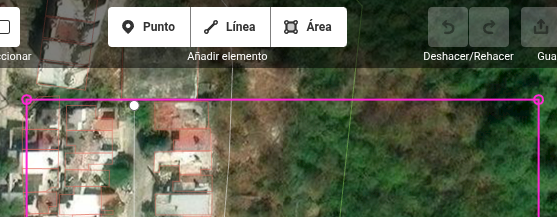
Pero una cosa que extrañaba de ID Editor era que mi área de trabajo en JOSM estuviera delimitada con ese cuadro de color magenta. Estuve buscando en mis ratos libres hasta que encontré como cambiarlo.

See full entry

– only in Portuguese

Editora IVIDES abriu período de inscrições de propostas de capítulos para o segundo volume do livro


O prazo de submissão de proposta de capítulo para o livro “Estudos de caso em mapeamentos colaborativo e participativo”, volume 2, a ser lançado em 2026, foi estendido para aumentar o alcance da participação.

O livro possui uma seção sobre mapeamento com OpenStreetMap.

Prazo: 22 SET 2025

Idioma: português (qualquer variante)

Inscrições: https://ee.kobotoolbox.org/x/hBOFWAAg

No formulário para envio da proposta, são solicitados um resumo (400 a 500 palavras) e o nome do(a) autor(a) principal.

Será oferecido um prazo de 3 meses para envio do original e da lista completa de autores.

Preencha com cuidado o formulário para que possamos retornar o contato, a fim de organizar a sua participação.

O primeiro volume da obra pode ser obtido em: https://ivides.org/livros


capa_livro

See full entry

RapiD editor has rather unique feature that it can flag pedestrian crossings where node and way are tagged differently. But how to know where are such crossings if you can’t load entire city or country into iD editor? Luckily there’s overpass syntax for that. Quite a few people found this query useful, therefore I’m sharing it with wider audience.

Most of query was produced by LLM after feeding it with Overpass QL language reference. Only parent.u syntax needed manual fixing. I decided to use dynamic comparison of tag values because I wasn’t sure what would happen if there were some unique tagging typo, such as crossing=marked2 or similar.

[out:json][timeout:180];
{{geocodeArea:Estonia}}->.a;

/* Ways that explicitly have crossing=* */
way(area.a)["crossing"]->.ways;

/* Loop each way as .parent */
foreach.ways->.parent
{
  /* crossing=* nodes of parent, but
     with different crossing value */
  node(w.parent)["crossing"]
    (if: t["crossing"] != parent.u(t["crossing"]))
    ->.badnodes;

  /* Output if there is at least one mismatching node */
  (.badnodes;)->._;
  if (count(nodes) > 0)
  {
    .badnodes out tags geom meta; /* the mismatching node(s) */
    .parent   out tags geom meta; /* the parent way */
  }
}

Originally published at OSM World Discord on 2025-08-23

First post in hopefully a series of entries where I’m planning to share various OSM-related experiments I have conducted over the years.

Mapper asked if area should be mapped as grassland, scrub or heath. Since this kind of information is better to be extracted from infrared imagery, without knowing where the mapper is from, I pointed them to use global satellite dataset provided by European Space Agency (OSM wiki link) at Copernicus browser.

Two most commonly user IR imageries are using CIR-NRG and CIR-NGR styles. These acronyms essentially mean that when compared to regular RGB (red, green, blue) pictures, infrared images drop blue signal channel and instead use IR as red, and then original red and green as green and blue. For NRG, red becomes green and green turns blue; NGR is vice versa with green staying green and reds are blue.

Turned out that while Copernicus does have multiple infrared imagery layers (such as one simply called False Color is NGR), but because infrared channel is relatively overexposed compared to visible light, then default configuration showed nothing but red (IR) patches on black earth. Solution was building a custom rendering with linear adjustments.
In hindsight, Copernicus browser has button called “Effects and advanced options applied” where one could apply most of those transformations directly without custom layers.

Anyways, custom layer is basically javascript code that should execute on client’s browser for every single pixel on image and calculate RGB values for each. Here’s the tutorial.
I haven’t figured out most feasible way to add pictures to diary posts yet.

  • Go to https://browser.dataspace.copernicus.eu/
  • Click on green diagonal arrow (↗️) on sidepanel to see latest images
  • Select Layers -> Custom (at bottom of list) -> Custom script (rightmost tab)
  • Paste script and click apply below textbox.
  • Colour balance and lightness can be tweaked using sliders under button “Effects and advanced options applied”

See full entry

Posted by aselnigu on 14 September 2025 in English. Last updated on 20 September 2025.

You can find a German version of this article here: Kreise in MapLibre

I want to integrate a Geolocate control into a MapLibre map and customize it both visually and functionally to fit my app.

At first, I considered using the GeolocateControl that comes standard with MapLibre. However, I quickly discarded this approach because adapting it to my needs seemed too cumbersome without a lot of fiddling.

My goal is that when the button is clicked, the display of the current location is toggled—so it can be turned on and off.

MapLibre itself offers several ways to draw circles on the map, depending on whether they should be pixel-accurate or meter-accurate.

Circles on a MapLibre Map

My starting point is a simple map.

A simple map

See full entry

Posted by lpf452 on 14 September 2025 in English. Last updated on 1 October 2025.

As an OpenStreetMap contributor, I’ve always been dedicated to enhancing the detail and usability of local data. Recently, however, I ran into a frustrating problem: in areas I’ve mapped, the Chinese names for many places fail to display correctly in certain applications and services (like OsmAPP, JawgMaps, and MapTiler). Instead, they either fall back to Pinyin or default to the English name (name:en), which looks odd—especially when a primary name tag clearly exists but is simply ignored.

The root of the problem lies in the peculiar rendering rules of these applications, which often prioritize name:[lang] tags that match the user’s language. Even though we add a name tag, the absence of an explicit name:zh or name:zh-Hans tag can leave the renderer confused, causing it to fall back to name:en or just display the Pinyin transliteration.

Manually adding these tags to thousands of elements is obviously out of the question. You can’t just copy and paste your way through it; the sheer monotony would be mind-numbing. So, I decided to automate the process by writing a script.

Tech Stack and Script Logic

When high performance is a priority, C++ is the natural choice. I also leveraged two powerful open-source libraries:

  1. pugixml: A lightweight, high-performance C++ XML parser, perfect for rapidly reading and writing large .osm files.
  2. OpenCC: The community’s go-to library for Simplified and Traditional Chinese conversion, which I used to generate name:zh-Hant tags.

The core logic of my script is as follows:

See full entry

作为一名贡献者,我一直致力于提升本地 OSM 数据的细节和可用性。但是最近我发现一个令人困扰的问题:在我绘制过的区域,很多地点的中文名称在某些软件/服务中 (比如 OsmAPP、JawgMaps 和 MapTiler 的瓦片等)无法正确显示(回退为拼音),或是优先显示了英文名 (name:en),导致看起来怪怪的,明明有 name 但就是不用。

主要原因这些软件的神必渲染规则通常会优先寻找符合用户语言的 name:[lang] 标签。虽然我们加了 name 标签,但如果缺少了明确的 name:zhname:zh-Hans 标签,渲染器可能就会“不知所措”,转而去寻找 name:en 或干脆直接显示拼音。

手动为成千上万个要素添加这些标签显然是不现实的,又不能靠复制粘贴,一圈下来人可能都麻了。我决定靠自动化,也就是写一个脚本来解决这个问题。

技术选型与脚本逻辑

对于这种讲究高性能的操作,C++ 肯定是首选,我还用了两个强大的开源库:

  1. pugixml: 一个以轻量和高性能著称的 C++ XML 解析库,用来极速读写庞大的 .osm 文件。
  2. OpenCC: 社区公认的中文简繁转换标准库,用于生成 name:zh-Hant 标签。

我编写的脚本核心逻辑如下:

  1. 读取与解析: 使用 pugixml 加载从 Overpass API 查询的的本地 .osm 数据文件;
  2. 遍历要素: 循环遍历文件中的每一个 node wayrelation
  3. 定位目标: 检查元素是否含有 k="name"tag
  4. 生成标签: 如果找到 name 标签,则执行以下操作:
    • 复制 name 标签的值,创建新的 <tag k="name:zh" v="..."/>
    • 再次复制 name 标签的值,创建新的 <tag k="name:zh-Hans" v="..."/>
    • 调用 OpenCC 库(使用 s2twp.json),将 name 的值从简体中文转换为台湾地区通行的繁体中文,并创建 <tag k="name:zh-Hant" v="..."/>
  5. 生成变更文件: 将所有被修改的要素(保留其原始 version 号)写入一个全新的 .osc (osmChange) 文件中,以便上传。

这里我贴一个 AI 生成的代码 (懒得写),各位可以参考一下:

See full entry

Posted by catgirlseraid on 13 September 2025 in English.

To help make OSM more inclusive in line with the diversity statement https://osmfoundation.org/wiki/Diversity_Statement I’ve gone through the wiki and changed all relevant instances of specific pronouns to their gender neutral versions. This both encourages inclusivity by including non binary people, and makes the pages easier to understand.

Pages and text that have not been changed are statements by members of the community, talks, personal user pages and other related pages where changing the phrases would reflect directly on someone’s opinion.

This resulted in changes to around ~190 wiki pages, or if you include modified templates, another ~4100 pages. Below is a list of phrases I changed to their gender neutral version.

  • he/she
  • she/he
  • his/her
  • her/his
  • he or she
  • she or he
  • his or her
  • her or his
  • s/he
  • him/herself
  • her/himself
  • him/her
  • her/him

I’m surprised at the few recent pages still using he/she type references to people, namely the State Of The Map proposal for Paris 2026, especially after the drama around LGBT people and State Of The Map 2024.


Happy mapping, and I’m glad to help make the community more welcoming and accessable for all. <3
Phoebe