 OpenStreetMap

Don't map and drive - story of semi-failed OSM editor
Posted by fghj753 on 26 January 2026 in English.Second day of “quick” weekend project.
Frankly, I’ve run out of interesting things to map around my immediate surroundings. During the holiday season I travelled around the countryside and noticed long stretches of cycleways running alongside highways, occasionally featuring benches, bins, and similar roadside infrastructure. On one trip I tried mapping a rural street using EveryDoor, but the result was similar to summer cycling: frequent stopping dropped my average speed by 10–15 km/h.
I needed a solution where I could mass-save coordinates while moving, and deal with proper mapping later. Vespucci’s copy-paste workflow is probably the closest thing in the OSM ecosystem, but it still requires first tagging a node, then tapping the correct spot on the map. If the map is accidentally dragged, follow-position mode is disabled, and changing the type of copied element requires tagging a new node.
After concluding development I was suggested OsmAnd may support something similar.
I’m android user, so the problem was phrased as “Is there some Android app with a super fast UI for saving coordinates?”
A quick search showed that virtually no existing apps allow bulk bookmarking of unnamed unorganised coordinates My intention was save location something i could later properly map from aerial images. Most apps seemed to require at least 2-3 taps to save position, often with typing bookmark name.
Functional requirements
For time estimates and comparison I used my typical summertime EveryDoor mapping experience. Potential mapping-assisting app should consider these points:
- The app must pick location directly from phone GPS. Dragging the map to the exact location is slow.
- Dragging is also data-intensive. Inaccurate GPS forces switching to aerial imagery and zooming in to place nodes correctly. Using osm-carto consumes less data, but nodes often end up 20–40 m off.
- Since nodes are placed at phone GPS position, they will usually land on the road; definitely not where roadside infrastructure actually is.
- Therefore app must not upload data directly to OSM, but to own backend instead.
- No searching for presets. Typing while moving is error-prone, and preset search could easily fail due to typos.
- Loading presets and tagging would take an extra 15-45 seconds, or 500-1000 m at highway speeds.
- No detailed tagging in-app.
- The in-app don’t need valid OSM tags; simple predefined labels are sufficient.
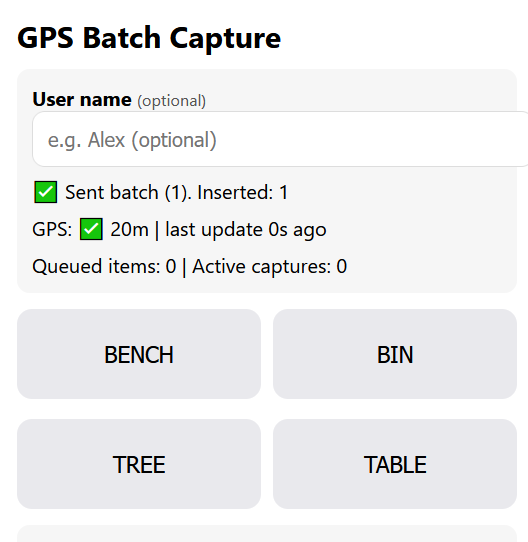
- No manual uploads. Button presses should be sent to the server automatically.
- Data should be sent in small batches to save data overhead
- 10 sec batch window turned out to be too short
- In the countryside, network connection could be unreliable
- GPS position must update as frequently as possible
- The app should always capture two positions per note, allowing speed and azimuth calculation if the browser doesn’t provide them.
- The time between two positions should be as long as possible to reduce noise
- Assume the phone is safely mounted near the dashboard or window pillar, close to the steering wheel
- Therefore time spent on hand movement is minimal
- Battery usage isn’t a concern due to car charging; keeping the screen active is a bigger issue.
- The app should support a small set of predefined node types, not just one. For example bench, bin and traffic calming.
- Since I’m mostly a web developer, the app ought to run in mobile browser.
- Ideally this would work like a dashcam “record” button, but:
- My dashcam has no GPS.
- A browser app can’t realistically control a third-party dashcam.
- Pulling images from the camera on button press is even harder.
- Dashcam Wi-Fi would disable mobile data.
- The dashcam is mounted near the rear-view mirror, making it harder to reach than the phone.
Implementation
Looking at message timestamps, it took roughly 40 minutes from the initial question to a basic MVP, and another 40 minutes to deploy, test on a phone, and fix obvious bugs. Unfortunately, I tested the app while stationary and didn’t notice that AI had implemented GPS caching twice leading to refresh 15 second refresh rate. Luckily i had phone during trip in split-screen mode shared with navigator, therefore i didn’t experience GPS refreshing errors like later.
After initial testing, I spent around 6 hours trying to bypass browser and OS restrictions to force faster GPS updates. Locking the screen dropped GPS entirely, although it could sometimes be recovered. I still don’t fully understand why, but the only way to get a reliable stream of coordinates was to keep a native GPS-using app (e.g. GMaps or a low-level GPS debugger) running alongside the browser in Android’s multitasking view. I even tried dual tracking with one thread polling precise and other WiFi positioning.
Aftermatch
Due to GPS caching, saving two points 2–10 seconds apart often resulted in identical coordinates. That made it very difficult to establish where the second object should be. Even worse, I often couldn’t remember what I had intended to mark despite having rough location and travelling direction.
In one location I had marked 1 bench and 1 bin, 8 seconds apart, at the same coordinates. Eight seconds corresponds to roughly a 150–200 m search radius. Within that area I found 4 bins and 3 benches from rather blurry imagery, 5 of them already mapped.
Secondary coordinate pairs for speed and direction rarely worked because cached positions were reused. Luckily many points had azimuth information, but speed was usually missing.
I didn’t actually encounter any traffic tables, that label was repurposed as bicycle parking. A grey, unsortable HTML table of decimal coordinates wasn’t very helpful either, so today I added a basic Leaflet map view to render the notes spatially.
Now that I’ve started mapping some of these notes, I also need a way to delete or mark resolved entries. Potential workaround is downloading the SQLite database, editing it locally, and uploading it back to the server.
Technical
Setup is simple:
- 1x Sqlite database (single table)
- 2x PHP backend endpoints (read & insert)
- 3x UI views (data entry, table view, map view)
Ideally the database should be more normalized, but this was a 30-minute prototype and there was no time to improve schema. If this hadn’t worked at all, I would have just stored raw JSON requests as text files.
There’s currently no real authentication beyond an optional username field. Currently it could be treated as extra additional information field.
Source code at github. Code is currently written by approx. 50% GPT, 40% Claude, 10% me.
Few screenshots. Data entry view:
And map view
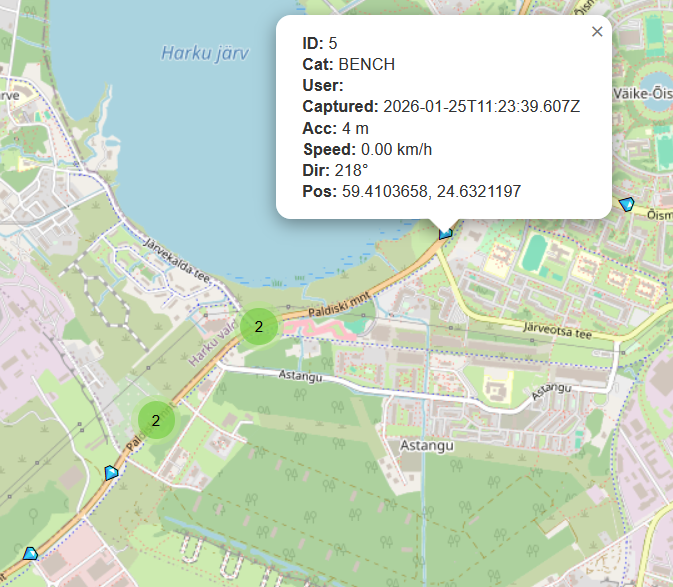
While the prototype works technically, using the collected data turned out to be harder than expected. The experiment was still useful as i now have 100+ potential features to map. About 1/4 of them was added in changeset/177738315.
PS. Do not try this at home, nor away. Only as passenger.


Discussion
Comment from kwiatek_123 on 27 January 2026 at 21:08
OSMTRacker is not the app you are looking for?
Comment from fghj753 on 27 January 2026 at 21:25
Cool! From recording-functionality and UX-wise it’s spot-on. Post-recording UI is confusing to put it mildly. I really like it supports dashboard customisation. I may need to look into it later this year.
Comment from trigpoint on 28 January 2026 at 13:50
This article is shockingly irresponsible.
Touching a phone whilst driving (in control of a motor vehicle) is both illegal and irresponsible.
Most dashcams have GPS, invest in one and do your mapping when you get home.
Comment from kwiatek_123 on 28 January 2026 at 13:53
No, it is not illegal in many countries.
Comment from trigpoint on 28 January 2026 at 14:09
https://www.digitalphablet.com/infotainment/top-countries-with-strict-laws-on-phone-use-while-driving/
Suggests otherwise.
Comment from kwiatek_123 on 28 January 2026 at 14:13
Hands-free does not mean without touching. For example, in Poland, you cannot use your phone while holding it in your hand, but you can use a holder and touch the screen.
Comment from SimonPoole on 28 January 2026 at 16:32
You are just re-finding out what was has been found out multiple times over the last two decades.
The pragmatic and practical approach, learnt the hard way, has been to create street level imagery, early on with mapillary, these days with Panoramax and then add information from that with your fav editor after the fact.
On the legal front I would note that you will need to investigate what local restrictions on generating such images are applicable for you.
Comment from rphyrin on 29 January 2026 at 09:22
I have this exact same problem with you, so I built this instead, haha.
Comment from fghj753 on 29 January 2026 at 10:03
Simon and Trigpoint, most major roads are already covered by street-level imagery and high-res aerials. Problem is not accessing imagery, but to bookmark exact spot for surveyed feature as accurately as possible to save time from skimming all roadside imagery (and risk missing said feature due to motion blur). GPS-enabled dashcam is valid suggestion, but as pointed out in article, dashcam is mounted usually farther from person sitting than phone mount, thus elongating time it takes to bookmark desired location.
This point won’t apply if there’s dashcams with external record button, which could be mounted closer to operator, however being such a specialized hardware it’s probably not economically feasible.
Regarding legal side, since most such feedback have been coming from brits claiming you can’t touch phone while driving, i researched british laws. I’m not a professional legalese-speaker, therefore pardon if i mess up terms like paragraph, section, article etc. But looks like British laws are actually much more relaxed about driving distractions than others’.
Highway code rule 149:
Looks like code itself is not enforcable and actual ban comes from The Road Vehicles (Construction and Use) of 2003 which does prohibit any use of phone or hand-held device “which performs an interactive communication function by transmitting and receiving data”.
Iteresting to note from british laws is if you take two antique morse devices (ones with separate speaker and button) and remove speaker from one and button from other, then it is legal to hold both of them in hand and hold two separate morse monologues at once because now they aren’t capable of holding two-way interactive communications nor are they telephones. Bit less practical bypass is to mount optical communication device (such as blinking laser), because ban only applies to radio devices.
My original suggestion was desolder antenna from old phone and run app there, but then it would still be telephone (or what’s left of it).
PS. 110.6.d.2 suggests that the ban applies only to radio devices that operate in specific radio bands. This gets so complicated i couldn’t comprehend them currently, but looks like that very carefully configured tablet that can’t hold phone calls could actually be legal to be used while driving because it fits (or doesn’t fit) these specific radio frequency ranges mentioned.
@rphyrin. I didn’t define additional constraint, but i can’t trust my phone to persist sessions and local storage for long enough, therefore i opted solution which could quickly upload changes. I do like your app’s clean UI.
Comment from trigpoint on 29 January 2026 at 10:52
You seem to have found some old legislation.
A reputable motoring magazine explains it pretty well.
https://www.parkers.co.uk/car-advice/mobile-phones/new-law/
The particularly relevant section is
Is it legal to use a phone as sat nav?
Yes, it is. However, you can’t touch your phone for any reason while driving. If you need to touch your phone to accept a route change or set a new destination, stop in a safe place and turn the car’s engine off to do so. Or use your phone’s voice controls.